Automated invoice reminders for relationship-led businesses
Solido generates and sends personalised, invoice reminders in your business' own voice, based on your rules.

30% less DSO
Consistent follow-up can reduce DSO by up to 30%
20 hrs +
Save 20+ hours per week on AR admin
30-day
30-day free trial
How Solido works for your business

Automated reminders on your terms
You set the rules - how many days before or after the due date, what time of day, which days of the week. Solido sends the emails automatically, but the logic is entirely yours.

Emails that come from you
Reminders are sent from your Microsoft 365 or Google Workspace account, not a generic system address. Clients can reply directly, and the conversation stays in your inbox.

Always in sync with Xero
Invoices and contacts sync automatically from your accounting software. When a client pays, Solido picks up the status change and stops sending reminders for that invoice.

Visibility into what's happening
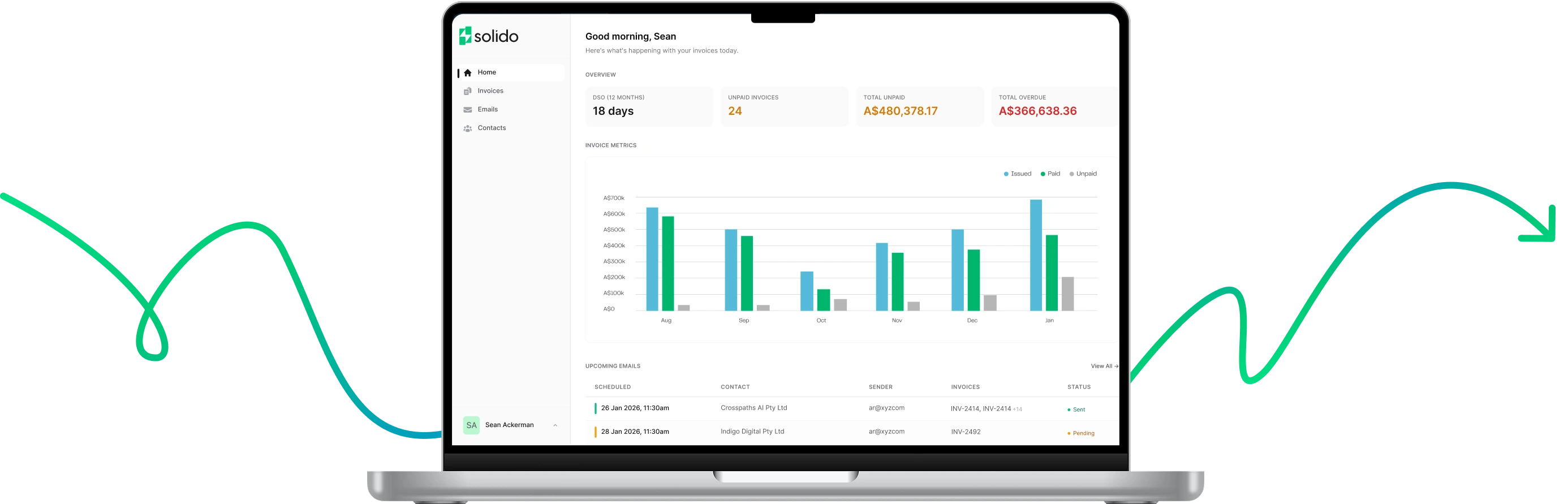
The dashboard shows your unpaid and overdue totals, upcoming scheduled emails, and recent activity. You can see exactly what's been sent and what's coming up.

Used by consulting firms, agencies, and professional services teams across Australia and New Zealand

"We wanted to automate reminders but were worried about how it would come across to clients. Solido gave us the control we needed to do it in a way that felt right for our business."
Darren Cook
CEO, Adaca

What's included

Dashboard & Analytics
See unpaid invoices, overdue amounts, and DSO trends in one place

Automated Reminders
Set rules for when reminders go out - Solido handles the rest

Manual Emails
Send one-off emails when you want a more personal approach

Contact Management
Control who receives reminders and who doesn't

AI-Generated Emails
Emails are composed based on the rules you set for each reminder stage

Microsoft & Google Integration
Send emails from your own mailbox

Team Collaboration
Invite team members and connect multiple mailboxes

Multi-Workspace
Manage multiple businesses from one account
Getting Started Takes About 10 Minutes

Step 1: Connect
Link your Xero account. Your invoices and contacts will sync automatically.

Step 2: Configure
Set up your reminder rules - when to send, how often, and from which mailbox.

Step 3: Monitor
Solido sends reminders on your schedule. You can check in from the dashboard, make adjustments, or step in manually whenever you need to.